# Remix
Remix is a browser-based IDE that allows developers to write, compile, deploy, and interact with smart contracts — no local setup required. This guide walks you through deploying a contract to the Neura Testnet using Remix and MetaMask.
### Prerequisites
Before you begin, make sure to:
1. Install a Web3 wallet (e.g., [MetaMask](https://metamask.io))
2. Add the Neura Testnet to your wallet:
```yaml
Network Name: Neura Testnet
RPC URL: https://testnet.rpc.neuraprotocol.io/
Chain ID: 267
Currency Symbol: ANKR
```
3. Fund your wallet with testnet tokens from the Neura Faucet:
* [Neura Faucet](https://neuraverse.neuraprotocol.io/?section=faucet)
4. Open [Remix IDE](https://remix.ethereum.org/) in your browser, and start working in a default workspace.
***
### Create and Configure Contract
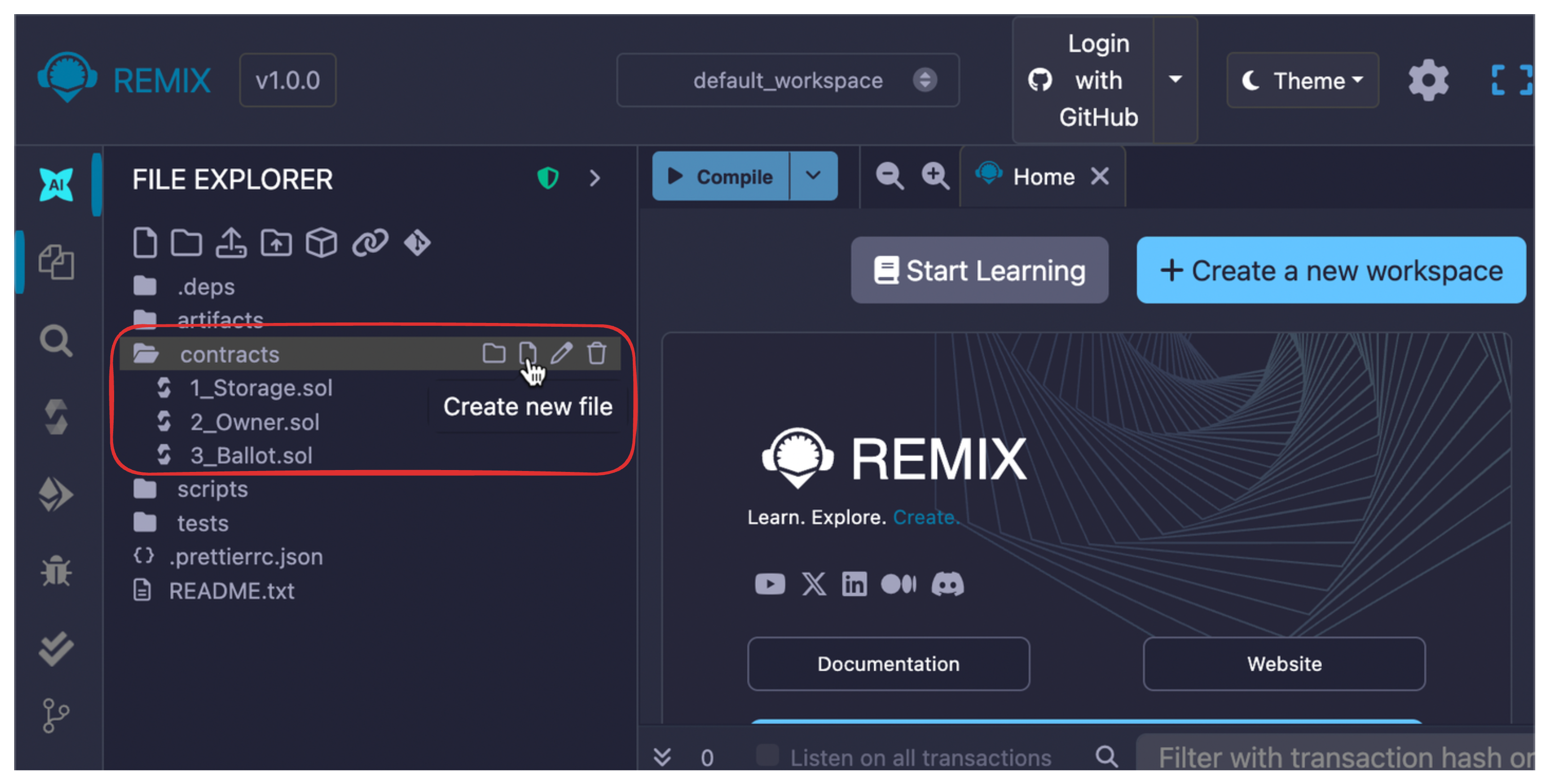
1. On the **File Explorer** tab, in the `contracts/` folder, click **Create a new file**.
2. Name it `Greeter.sol`.
3. Paste the following contract code:
```solidity
// SPDX-License-Identifier: MIT
pragma solidity >=0.8.0 <=0.8.24;
contract Greeter {
string public greeting;
constructor(string memory _greeting) {
greeting = _greeting;
}
function setGreeting(string calldata _greeting) external {
greeting = _greeting;
}
}
```
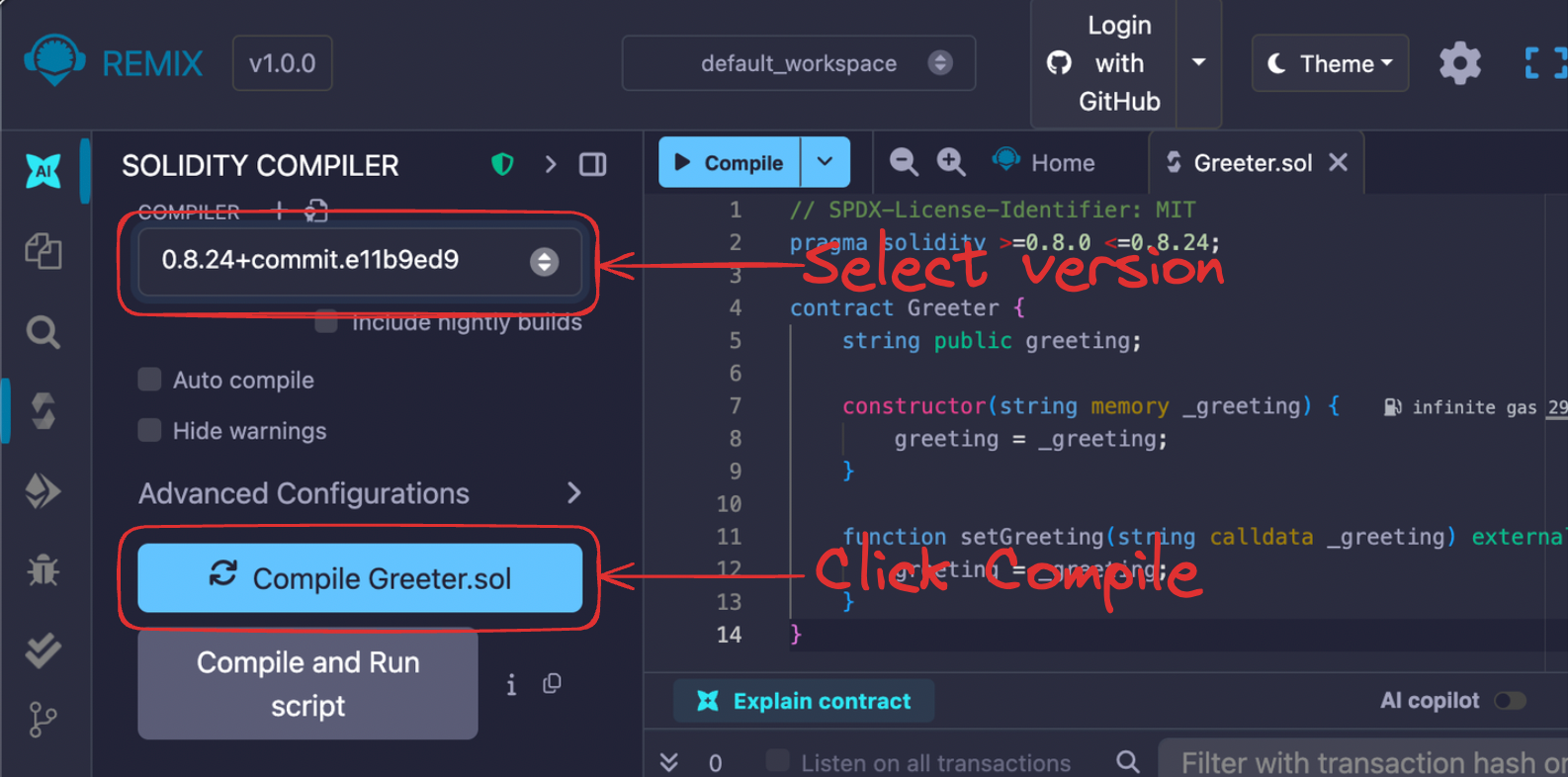
**Note**: Neura supports Solidity compiler versions from `0.8.0` to `0.8.24`, inclusive. Use this range for compatibility.
***
### Compile Contract
1. On the **Solidity compiler** tab, select the compatible compiler version (`0.8.0` — `0.8.24`), and then click **Compile Greeter.sol**.
2. Successful compilation is shown by the green check mark on the **Compiler** tab in the left sidebar.
***
### Deploy to Neura Testnet
1. On the **Deploy & run transactions** tab, do the following:
* Set **Environment** to: **Browser extension >** **Injected Provider — MetaMask**.
* Allow Remix to connect to your wallet (MetaMask popup).
* Confirm that the connected Chain ID is 267 (Neura Testnet).
2. In the **Contract** field, select `Greeter — contracts/Greeter.sol`.
3. Enter your greeting string in the corresponding field, and then click **Deploy**.
```
"hello, neura"
```
4. Confirm the transaction in your MetaMask wallet.
***
### Deployed Contract Output
Once successful, you'll be able to:
* See a **Deployed Contracts** pane with the following info:
```yaml
Deployed at: 0xABC123...
```
* Interact with the deployed contract interface.
***
### Interact with Contract
Use Remix’s GUI to interact:
* `greeting()` — call the getter to return the current greeting.
* `setGreeting(string)` — update the greeting (triggers a MetaMask transaction confirmation).